 WHAMBOX
01Why do QR codes have three big squares in the corners?
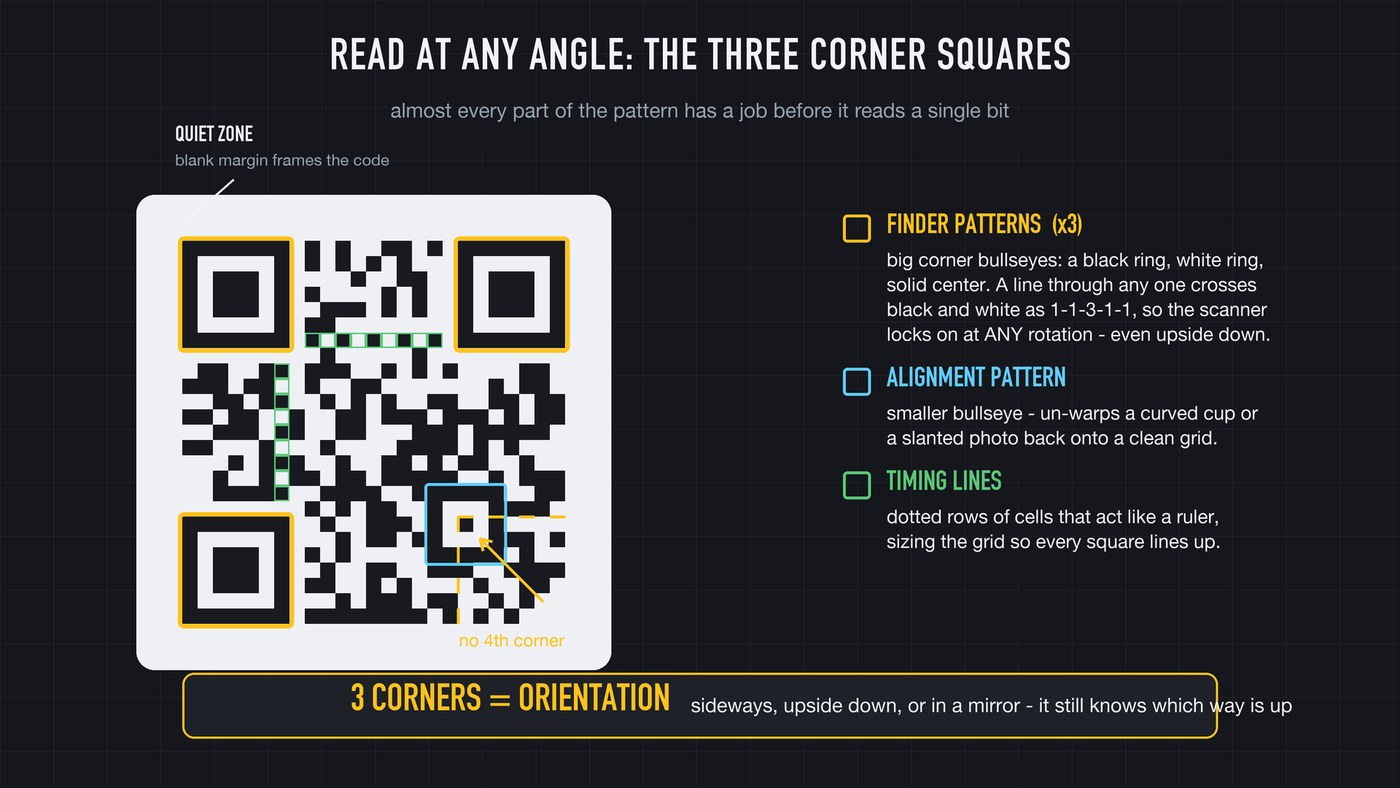
Look at any QR code and the first thing you notice is three big squares: top-left, top-right, bottom-left. Those are finder patterns, and they are the reason the code works at any angle.
Each one is a square inside a square inside a square: a black ring, a white ring, a solid black center. Draw a straight line through the middle of one, in any direction, and you cross black and white in the same ratio every time: one part black, one part white, three parts black, one part white, one part black. That 1-1-3-1-1 signature almost never shows up by accident in a normal image. Your camera doesn't hunt for a "QR code." It sweeps the picture looking for that ratio, and the moment it finds three of them, it knows exactly where the code sits.
And here's the clever part: there are three finder squares, not four. The missing fourth corner is the whole trick. Three points can only form one kind of right angle, so the instant the scanner locks onto three corners with an empty fourth, it knows which way the code is turned. Upside down, rotated, mirrored, it doesn't matter. The corners tell it which end is up before it reads a single bit of data.
02How does it scan on a curved cup?
Finding the corners tells the scanner where the code is and which way it faces. It still doesn't know how big the grid is, or what to do when the code is wrapped around a bottle and the squares aren't even squares anymore.
Two more built-in features solve that. The timing patterns are a single line of alternating black-and-white cells running between the finder squares, across the top and down the side. It looks like a dotted line and works like a ruler: by counting the alternations, the scanner learns exactly how many rows and columns the grid has.
Then, on all but the smallest codes, you'll spot little bullseye squares sprinkled through the pattern. Those are alignment patterns, and they act like survey markers. When the code is bent around a cup or shot at a slant, the scanner finds those known markers, measures how far they've drifted from where they should be, and mathematically un-warps the whole image back onto a clean grid. It isn't guessing. It's using fixed reference points to straighten the picture out.
03What do the black and white squares actually mean?
Strip away the corners, the timing line, and the alignment markers, and everything left is the data. Each little square is called a module, and each module is a single bit: black means one, white means zero. A QR code is a picture of ones and zeros laid out in a grid.
The scanner reads them in a set path, snaking up and down through columns of two, starting from the bottom right. It collects that long string of bits, groups them into bytes, and the bytes become numbers, letters, a web address, whatever the code was built to carry.
There is no magic in the data itself. It's binary, the same ones and zeros running through every computer, just printed instead of stored on a chip. You are literally looking at the raw file, in ink, with your own eyes.
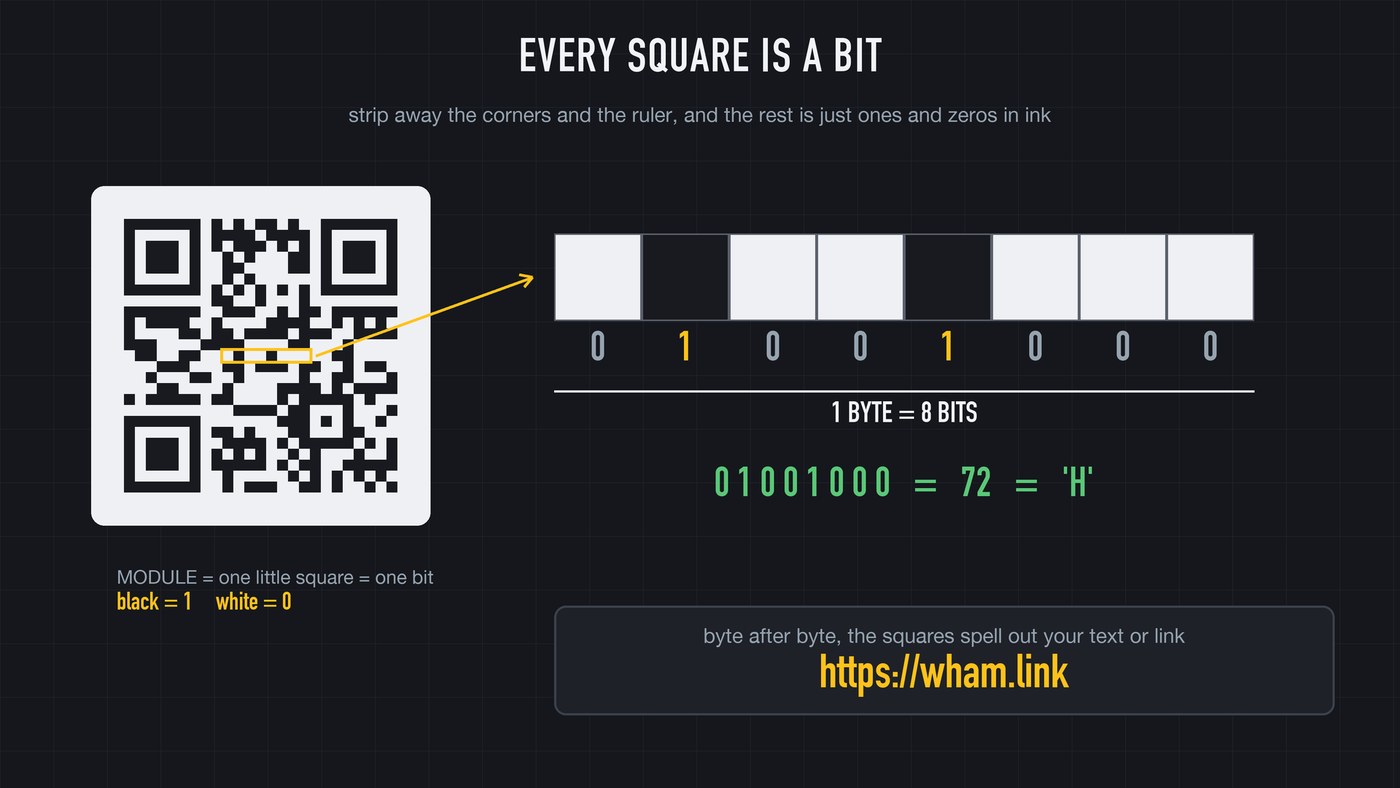
You're looking at the raw file, in ink.
04Why doesn't a coffee stain break it?
If the link is spelled out in exact black and white squares, how can a coffee ring, a logo over the center, or a torn-off chunk not wreck it? This is the best idea in the whole design: error correction.
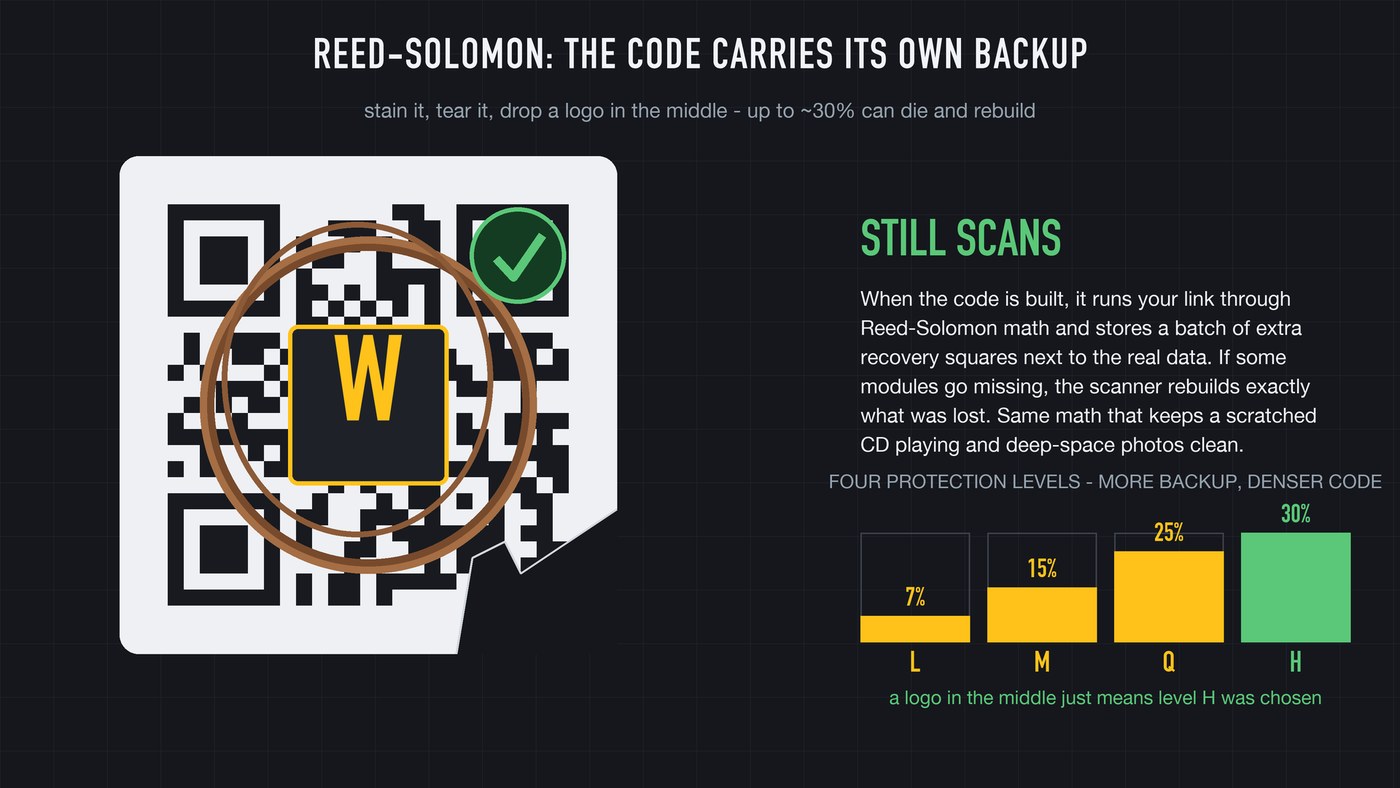
When a QR code is made, it doesn't just store your link. It runs the link through a piece of math called Reed-Solomon and stores a batch of extra recovery squares alongside the real data. Those extra modules are calculated so that if some of the data goes missing or gets misread, the scanner can rebuild exactly what was lost. It's the same family of math that keeps a scratched CD playing and lets deep-space probes send clean photos back across billions of miles.
You choose how much protection to bake in. There are four levels: the lowest recovers from about 7% damage, the highest from roughly 30% of the code being destroyed. That's the secret behind QR codes with a logo dropped in the middle. The designer cranked error correction to the high level, so almost a third of the pattern can be blocked and the scanner still reconstructs the full link from what's left. The code is carrying its own backup.
05The quiet zone, versions, and format info
A few smaller pieces finish the machine. The quiet zone is the blank margin around the whole code. It looks like empty space, but it's required: the scanner needs a clear border to know where the code ends and the busy world begins. Cram text or pictures right up against a code and it can fail for that reason alone.
Size comes in versions, from a 21-by-21 grid up to 177 squares per side. Bigger version, more modules, more data: a small one holds a short link, the largest packs in thousands of characters.
And tucked next to the finder patterns is the format information, the instruction label the scanner reads before anything else. It says which error-correction level the code uses and which mask was applied (a pattern flipped over the data to keep the squares from clumping into confusing blank blocks). It's so important it's stored twice, in two places, so even a damaged copy can't hide the instructions.
06One scan, start to finish
Put it together in the half-second a scan actually takes. Your camera sweeps the image hunting the 1-1-3-1-1 ratio and locks three finder squares. The empty fourth corner gives it rotation. The timing line sizes the grid, the alignment markers un-warp any curve or tilt, and the format info reveals the mask and protection level.
It lifts the mask, snakes through the data turning black and white into ones and zeros, runs Reed-Solomon to repair whatever the coffee stain destroyed, and out pops your link. All of that, from a smudged code on a curved cup, faster than you can read this sentence.
07The catch: quishing, glare, and tracking
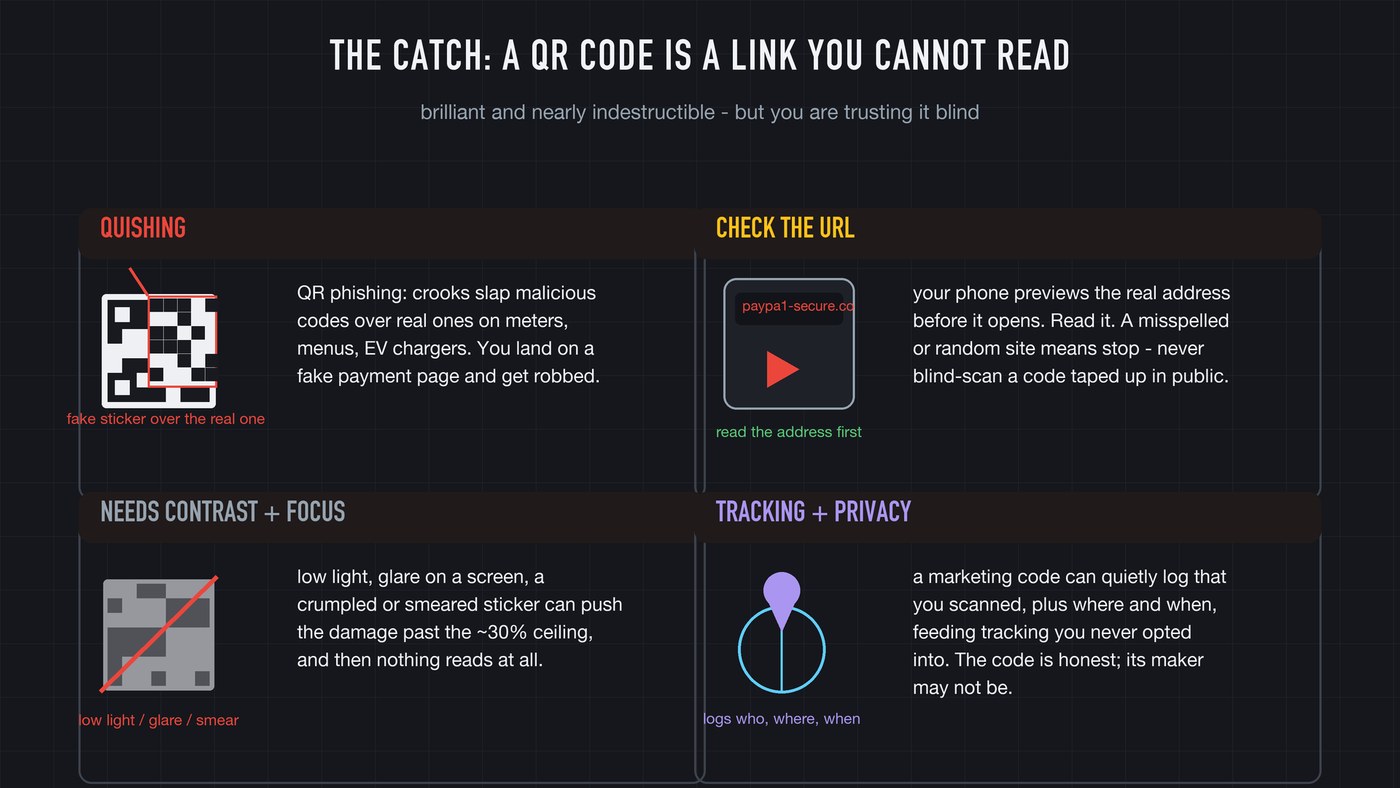
A QR code is nearly indestructible. It is not safe, and the reason is simple: a QR code is a link you can't read. Your eyes can't tell where it points, so you're trusting it blind, and scammers know it.
There's a fast-growing con called quishing, QR-code phishing. Criminals print malicious codes on stickers and slap them over real ones on parking meters, restaurant tables, and EV chargers. You scan what looks legit, land on a fake payment page, and hand your card details to a thief. The fix is discipline: your phone shows the actual web address before it opens. Read it. A parking meter pointing at a misspelled random site is a stop sign.
Two more honest limits. Codes need decent contrast and focus: low light, glare, a crumpled sticker, or smeared print can push the damage past even the 30% ceiling, and then nothing reads. And a marketing QR code can quietly log that you scanned it, where, and when. The code is honest. Whoever made it may not be.
08Myth vs mechanism
Myth one: a QR code is a random mess of squares. It's the opposite. Almost every region has a job: three corners for orientation, a dotted ruler for scale, bullseyes to un-warp curves, a quiet border, an instruction label, and only then the data, wrapped in its own self-repairing backup. Nothing in there is decoration.
Myth two: your phone does something magical to read it at any angle. It doesn't. The intelligence is printed into the pattern. The code tells the camera which way is up, how big it is, how to flatten the curve, and how to fix its own damage. The phone just follows the instructions the code is holding up.
A grid of black and white bits, framed by three squares that fix its orientation, calibrated by a ruler and a set of markers, and armored with enough spare math that you can tear off a third of it and still get exactly where it was sending you. Just look before you leap.
- A QR code is printed binary: black modules are 1s, white modules are 0s.
- Three corner finder squares with a 1-1-3-1-1 ratio give the scanner position and rotation, which is why any angle works.
- Timing and alignment patterns size the grid and un-warp curves and tilt.
- Reed-Solomon error correction stores recovery data, so up to ~30% of the code can be destroyed and still scan.
- The danger isn't the code, it's the link you can't read: check the URL preview before you tap, especially on public stickers.
More how it actually works
Frequently asked
How do QR codes work?
A QR code stores data as a grid of black and white squares, where black is a binary 1 and white is a 0. Three large corner squares tell the scanner where the code is and how it's rotated, built-in markers let it correct for curves and tilt, and error-correction math lets it rebuild damaged sections before handing over the link.
How much of a QR code can be damaged and still scan?
Up to about 30% at the highest of the four error-correction levels, thanks to Reed-Solomon recovery data stored alongside the real content. The lowest level tolerates about 7% damage.
Why do QR codes have three squares instead of four?
The three finder squares plus the deliberately empty fourth corner reveal the code's rotation. Three points form only one possible right-angle arrangement, so the scanner instantly knows which way is up.
Are QR codes dangerous to scan?
The scan itself is harmless, but the link can be malicious. In quishing scams, criminals paste fake codes over real ones on parking meters and menus. Always read the URL preview your phone shows before opening it.